Inventory and Test catalog
The ANTA framework needs 2 important inputs from the user to run:
- A device inventory
- A test catalog.
Both inputs can be defined in a file or programmatically.
Device Inventory
A device inventory is an instance of the AntaInventory class.
Device Inventory File
The ANTA device inventory can easily be defined as a YAML file. The file must comply with the following structure:
anta_inventory:
  hosts:
    - host: < ip address value >
      port: < TCP port for eAPI. Default is 443 (Optional)>
      name: < name to display in report. Default is host:port (Optional) >
      tags: < list of tags to use to filter inventory during tests >
      disable_cache: < Disable cache per hosts. Default is False. >
      use_session_auth: < Enable session-based authentication for this host. Default is False. >
      ssl_params:
        ciphers: < OpenSSL cipher list. Default is inherited from ANTA_SSL_CIPHERS. >
        verify: < Verify the HTTPS certificate. Default is False. >
        check_hostname: < Verify the certificate hostname. Requires verify. Default is False. >
  networks:
    - network: < network using CIDR notation >
      tags: < list of tags to use to filter inventory during tests >
      disable_cache: < Disable cache per network. Default is False. >
      use_session_auth: < Enable session-based authentication for all hosts in this network. Default is False. >
      ssl_params: < SSL parameters applied to all hosts in this network. >
  ranges:
    - start: < first ip address value of the range >
      end: < last ip address value of the range >
      tags: < list of tags to use to filter inventory during tests >
      disable_cache: < Disable cache per range. Default is False. >
      use_session_auth: < Enable session-based authentication for all hosts in this range. Default is False. >
      ssl_params: < SSL parameters applied to all hosts in this range. >
The inventory file must start with the anta_inventory key then define one or multiple methods:
hosts: define each device individuallynetworks: scan a network for devices accessible via eAPIranges: scan a range for devices accessible via eAPI
A full description of the inventory model is available in API documentation
Info
Caching can be disabled per device, network or range by setting the disable_cache key to True in the inventory file. For more details about how caching is implemented in ANTA, please refer to Caching in ANTA.
Info
Session-based authentication can be enabled per device, network or range by setting use_session_auth: true. The per-device value can be overridden globally via the --use-session-auth / --no-session-auth CLI flags or the ANTA_USE_SESSION_AUTH environment variable. Session-based authentication is only available on device types that advertise the supports_session_auth capability (e.g. AsyncEOSDevice). If use_session_auth is enabled in the inventory for a device type that does not support it, ANTA raises an exception during inventory loading; if it is requested globally from the CLI or environment variable, ANTA logs a warning for unsupported devices.
Info
SSL parameters can be configured per device, network or range. When ssl_params is omitted, HTTPS connections inherit the cipher list from ANTA_SSL_CIPHERS. An explicit ssl_params mapping takes precedence; use ssl_params: {} to keep Python’s default ciphers for one inventory entry when the global variable is set. Inventory parsing is independent of the device implementation: if a device type does not support SSL, parsing succeeds and ANTA warns that the SSL parameters are ignored for that device.
Example
---
anta_inventory:
  hosts:
  - host: 192.168.0.10
    name: spine01
    tags: ['fabric', 'spine']
  - host: 192.168.0.11
    name: spine02
    tags: ['fabric', 'spine']
  networks:
  - network: '192.168.110.0/24'
    tags: ['fabric', 'leaf']
  ranges:
  - start: 10.0.0.9
    end: 10.0.0.11
    tags: ['fabric', 'l2leaf']
Device Connection and Refresh
Before running tests or other eAPI commands, ANTA refreshes each device to verify its endpoint and collect platform information. ANTA refreshes inventory devices concurrently, while the requests shown below occur sequentially for each device.
--timeout and ANTA_TIMEOUT configure the timeout used for eAPI command requests, including inventory refresh, tests, anta exec, and anta debug. They do not configure the preliminary eAPI endpoint check or session login; each of those requests gets its own fixed five-second HTTPX timeout window.
%%{init: {"sequence": {"actorMargin": 220, "diagramMarginX": 20, "messageMargin": 16, "noteMargin": 6}}}%%
sequenceDiagram
    participant ANTA
    participant EOS as EOS eAPI

    opt Session authentication enabled
        ANTA->>EOS: POST /login
        Note over ANTA,EOS: HTTPX timeout: 5 seconds
        EOS-->>ANTA: Session cookie
    end

    ANTA->>EOS: HEAD /command-api
    Note over ANTA,EOS: HTTPX timeout: 5 seconds
    EOS-->>ANTA: Endpoint available

    ANTA->>EOS: show version
    Note over ANTA,EOS: --timeout / ANTA_TIMEOUT
    EOS-->>ANTA: Platform information

    opt Chassis platform
        ANTA->>EOS: show module
        Note over ANTA,EOS: --timeout / ANTA_TIMEOUT
        EOS-->>ANTA: Module information
    end
With session authentication, login occurs before the endpoint check. The timeout values are independent and do not form a single overall deadline.
Test Catalog
A test catalog is an instance of the AntaCatalog class.
Test Catalog File
In addition to the inventory file, you also have to define a catalog of tests to execute against your devices. This catalog lists all your tests, their inputs and their tags.
A valid test catalog file must have the following structure in either YAML or JSON:
---
<Python module>:
    - <AntaTest subclass>:
        <AntaTest.Input compliant dictionary>
{
  "<Python module>": [
    {
      "<AntaTest subclass>": <AntaTest.Input compliant dictionary>
    }
  ]
}
Example
---
anta.tests.connectivity:
  - VerifyReachability:
      hosts:
        - source: Management0
          destination: 1.1.1.1
          vrf: MGMT
        - source: Management0
          destination: 8.8.8.8
          vrf: MGMT
      filters:
        tags: ['leaf']
      result_overwrite:
        categories:
          - "Overwritten category 1"
        description: "Test with overwritten description"
        custom_field: "Test run by John Doe"
or equivalent in JSON:
{
  "anta.tests.connectivity": [
    {
      "VerifyReachability": {
        "result_overwrite": {
          "description": "Test with overwritten description",
          "categories": [
            "Overwritten category 1"
          ],
          "custom_field": "Test run by John Doe"
        },
        "filters": {
          "tags": [
            "leaf"
          ]
        },
        "hosts": [
          {
            "destination": "1.1.1.1",
            "source": "Management0",
            "vrf": "MGMT"
          },
          {
            "destination": "8.8.8.8",
            "source": "Management0",
            "vrf": "MGMT"
          }
        ]
      }
    }
  ]
}
It is also possible to nest Python module definition:
anta.tests:
  connectivity:
    - VerifyReachability:
        hosts:
          - source: Management0
            destination: 1.1.1.1
            vrf: MGMT
          - source: Management0
            destination: 8.8.8.8
            vrf: MGMT
        filters:
          tags: ['leaf']
        result_overwrite:
          categories:
            - "Overwritten category 1"
          description: "Test with overwritten description"
          custom_field: "Test run by John Doe"
This test catalog example is maintained with all non-advisory tests defined in the anta.tests Python module.
Test tags
All tests can be defined with a list of user defined tags. These tags will be mapped with device tags: when at least one tag is defined for a test, this test will only be executed on devices with the same tag. If a test is defined in the catalog without any tags, the test will be executed on all devices.
anta.tests.system:
  - VerifyUptime:
      minimum: 10
      filters:
        tags: ['demo', 'leaf']
  - VerifyReloadCause:
  - VerifyCoredump:
  - VerifyAgentLogs:
  - VerifyCPUUtilization:
      filters:
        tags: ['leaf']
Info
When using the CLI, you can filter the NRFU execution using tags. Refer to this section of the CLI documentation.
Tests available in ANTA
All tests available as part of the ANTA framework are defined under the anta.tests Python module and are categorised per family (Python submodule).
The complete list of the tests and their respective inputs is available at the tests section of this website.
To run a test to verify the EOS software version, you can do:
anta.tests.software:
  - VerifyEOSVersion:
It will load the test VerifyEOSVersion located in anta.tests.software. But since this test has mandatory inputs, we need to provide them as a dictionary in the YAML or JSON file:
anta.tests.software:
  - VerifyEOSVersion:
      # List of allowed EOS versions.
      versions:
        - 4.25.4M
        - 4.26.1F
{
  "anta.tests.software": [
    {
      "VerifyEOSVersion": {
        "versions": [
          "4.25.4M",
          "4.31.1F"
        ]
      }
    }
  ]
}
The following example is the catalog used throughout this documentation:
---
anta.tests.software:
  - VerifyEOSVersion: # Verifies the device is running one of the allowed EOS version.
      versions: # List of allowed EOS versions.
        - 4.31.4M
        - 4.32.1F
        - 4.34.0F-41661064.4340F (engineering build)
      filters:
        tags: [leaf, spine]
  - VerifyTerminAttrVersion:
      versions:
        - v1.38.0
      filters:
        tags: [leaf, spine]

anta.tests.system:
  - VerifyUptime: # Verifies the device uptime is higher than a value.
      minimum: 1
      filters:
        tags: [leaf, spine]
  - VerifyNTP:
      filters:
        tags: [leaf, spine]

anta.tests.mlag:
  - VerifyMlagStatus:
      filters:
        tags: [leaf, spine]
  - VerifyMlagInterfaces:
      filters:
        tags: [leaf, spine]
  - VerifyMlagConfigSanity:
      filters:
        tags: [leaf, spine]

anta.tests.configuration:
  - VerifyZeroTouch: # Verifies ZeroTouch is disabled.
      filters:
        tags: [leaf, spine]
Catalog with custom tests
In case you want to leverage your own tests collection, use your own Python package in the test catalog.
For instance, if a custom test is defined in the importable Python module anta_custom.dc_project, the test catalog entry is:
---
anta_custom.dc_project:
  - VerifyMinimumUptime:
      minimum: 1
Customize test description and categories
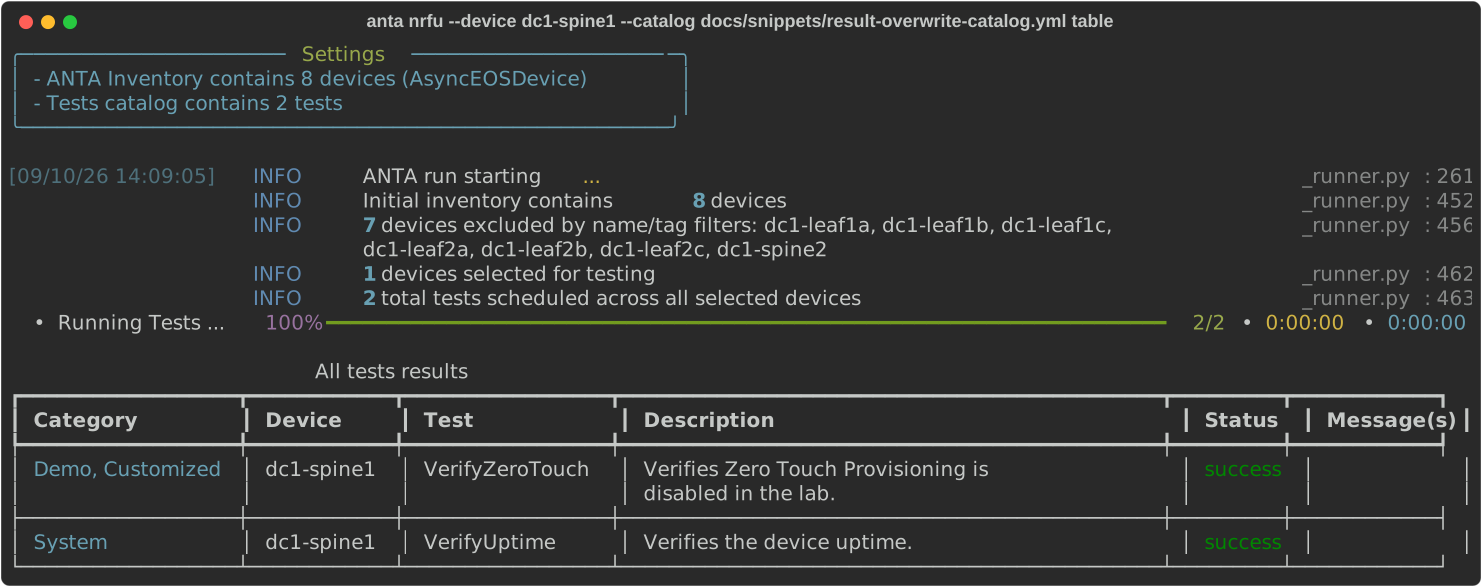
It might be interesting to use your own categories and customized test description to build a better report for your environment. ANTA comes with a handy feature to define your own categories and description in the report.
In your test catalog, use the result_overwrite dictionary with the categories and description keys to override these values in your report:
---
anta.tests.configuration:
  - VerifyZeroTouch:
      result_overwrite:
        categories: [demo, customized]
        description: Verifies Zero Touch Provisioning is disabled in the lab.

anta.tests.system:
  - VerifyUptime:
      minimum: 1
Run the catalog against a device:
anta nrfu --device dc1-spine1 --catalog docs/snippets/result-overwrite-catalog.yml table
Example script to merge catalogs
The following script reads all the files in intended/test_catalogs/ with names <device_name>-catalog.yml and merge them together inside one big catalog anta-catalog.yml using the new AntaCatalog.merge_catalogs() class method.
# Copyright (c) 2024 Arista Networks, Inc.
# Use of this source code is governed by the Apache License 2.0
# that can be found in the LICENSE file.
"""Script that merge a collection of catalogs into one AntaCatalog."""

from pathlib import Path

from anta.catalog import AntaCatalog
from anta.models import AntaTest

CATALOG_SUFFIX = "-catalog.yml"
CATALOG_DIR = "intended/test_catalogs/"

if __name__ == "__main__":
    catalogs = []
    for file in Path(CATALOG_DIR).glob("*" + CATALOG_SUFFIX):
        device = str(file).removesuffix(CATALOG_SUFFIX).removeprefix(CATALOG_DIR)
        print(f"Loading test catalog for device {device}")
        catalog = AntaCatalog.parse(file)
        # Add the device name as a tag to all tests in the catalog
        for test in catalog.tests:
            test.inputs.filters = AntaTest.Input.Filters(tags={device})
        catalogs.append(catalog)

    # Merge all catalogs
    merged_catalog = AntaCatalog.merge_catalogs(catalogs)

    # Save the merged catalog to a file
    with Path("anta-catalog.yml").open("w") as f:
        f.write(merged_catalog.dump().yaml())
Warning
The AntaCatalog.merge() method is deprecated and will be removed in ANTA v2.0. Please use the AntaCatalog.merge_catalogs() class method instead.