Usage
Preview
The anta psirt command is a preview feature. Its interface and behavior may change at any time without a deprecation notice.
Report availability
JSON, text, and table reports are not currently implemented for anta psirt.
The anta psirt command runs security advisory tests from the complete built-in
catalog installed with ANTA. It shares inventory options, filters, execution
behavior, and exit handling with anta nrfu.
Command overview
$ anta psirt --help
Usage: anta psirt [OPTIONS] COMMAND [ARGS]...

  [PREVIEW] Run ANTA tests for Arista security advisories. This command is a
  preview feature; its interface and behavior may change at any time without a
  deprecation notice. JSON, text, and table reports are not currently
  implemented.

Options:
  -u, --username TEXT             Username to connect to EOS  [env var:
                                  ANTA_USERNAME; required]
  -p, --password TEXT             Password to connect to EOS that must be
                                  provided. It can be prompted using '--
                                  prompt' option.  [env var: ANTA_PASSWORD]
  --enable-password TEXT          Password to access EOS Privileged EXEC mode.
                                  It can be prompted using '--prompt' option.
                                  Requires '--enable' option.  [env var:
                                  ANTA_ENABLE_PASSWORD]
  --enable                        Some commands may require EOS Privileged
                                  EXEC mode. This option tries to access this
                                  mode before sending a command to the device.
                                  [env var: ANTA_ENABLE]
  -P, --prompt                    Prompt for passwords if they are not
                                  provided.  [env var: ANTA_PROMPT]
  --timeout FLOAT                 Global API timeout. This value will be used
                                  for all devices.  [env var: ANTA_TIMEOUT;
                                  default: 30.0]
  --insecure                      Disable SSH Host Key validation.  [env var:
                                  ANTA_INSECURE]
  --disable-cache                 Disable cache globally.  [env var:
                                  ANTA_DISABLE_CACHE]
  --use-session-auth / --no-session-auth
                                  Enable or explicitly disable eAPI session
                                  authentication globally. When unset, per-
                                  device inventory values apply.  [env var:
                                  ANTA_USE_SESSION_AUTH]
  -i, --inventory FILE            Path to the inventory YAML file.  [env var:
                                  ANTA_INVENTORY; required]
  --inventory-format [yaml|json]  Format of the inventory file, either 'yaml'
                                  or 'json'  [env var: ANTA_INVENTORY_FORMAT]
  --tags TEXT                     List of tags using comma as separator:
                                  tag1,tag2,tag3.  [env var: ANTA_TAGS]
  -d, --device TEXT               Run tests on a specific device. Can be
                                  provided multiple times.
  -t, --test TEXT                 Run only a specific security advisory test.
                                  Can be provided multiple times.
  --ignore-status                 Exit code will always be 0.  [env var:
                                  ANTA_PSIRT_IGNORE_STATUS]
  --ignore-error                  Ignore test errors when determining the exit
                                  code.  [env var: ANTA_PSIRT_IGNORE_ERROR]
  --hide [success|failure|error|skipped]
                                  Hide results by type: success / failure /
                                  error / skipped.
  --dry-run                       Run anta psirt command but stop before
                                  starting to execute the tests. Considers all
                                  devices as connected.  [env var:
                                  ANTA_PSIRT_DRY_RUN]
  --help                          Show this message and exit.

Commands:
  csv         Generate a detailed security advisory CSV report.
  md-report   Generate a detailed security advisory Markdown report.
  tpl-report  Generate a detailed security advisory report from a template.
Provide an inventory and credentials as you would for NRFU, using either command-line options or the shared ANTA environment variables. Then select a report format:
anta psirt md-report --md-output psirt.md

By default, the command runs every test registered in the built-in
anta.tests.advisories catalog.
All security advisory tests share the same preview warning. ANTA logs
Security Advisory tests are in preview once during a command invocation,
regardless of how many advisory tests or devices are selected.
Use --test to filter the built-in catalog and run only selected security
advisories. Provide the advisory test class name:
anta psirt --test SA117 md-report --md-output sa117.md
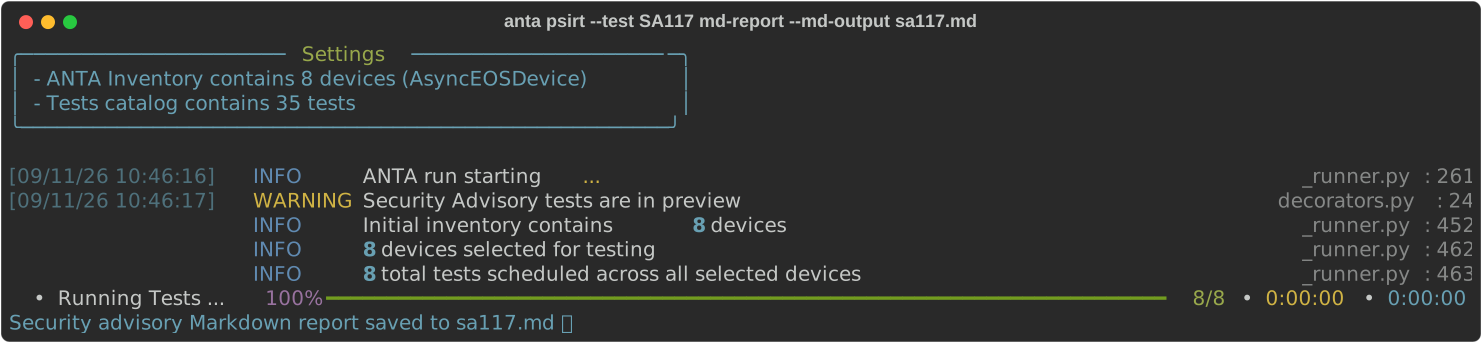
Repeat --test to assess multiple selected advisories.
PSIRT-specific execution settings can be configured with:
ANTA_PSIRT_IGNORE_STATUSANTA_PSIRT_IGNORE_ERRORANTA_PSIRT_DRY_RUN
The command accepts the shared ANTA environment variables documented in the
ANTA CLI overview, except for
the catalog-related variables and ANTA_DISCONNECT_INVENTORY. The built-in
security advisory catalog cannot be overridden.
Reports
Choose Markdown for human review, CSV for automated processing, or a Jinja template for custom output. See Security Advisory Reports for a format comparison, result interpretation, remediation guidance, and the CSV schema.
Template reports
Template reports are intended for advanced customization. Reach out to the ANTA maintainers if you need help creating a template for your use case.
anta psirt --inventory inventory.yml csv --csv-output sa-report.csv
anta psirt --inventory inventory.yml md-report --md-output sa-report.md
anta psirt --inventory inventory.yml tpl-report --template report.j2 --output sa-report.txt
See the NRFU documentation for shared filters and dry-run behavior.